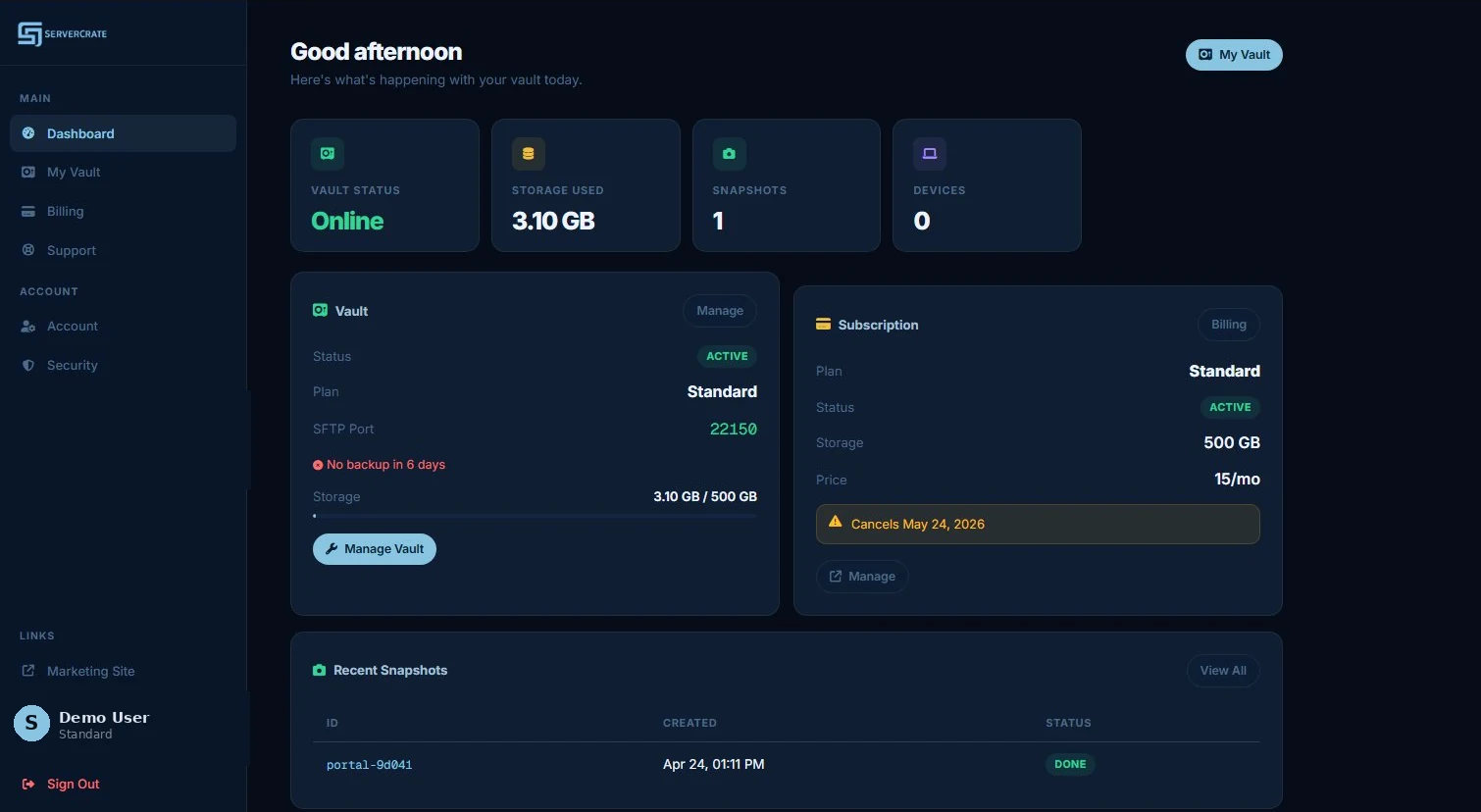
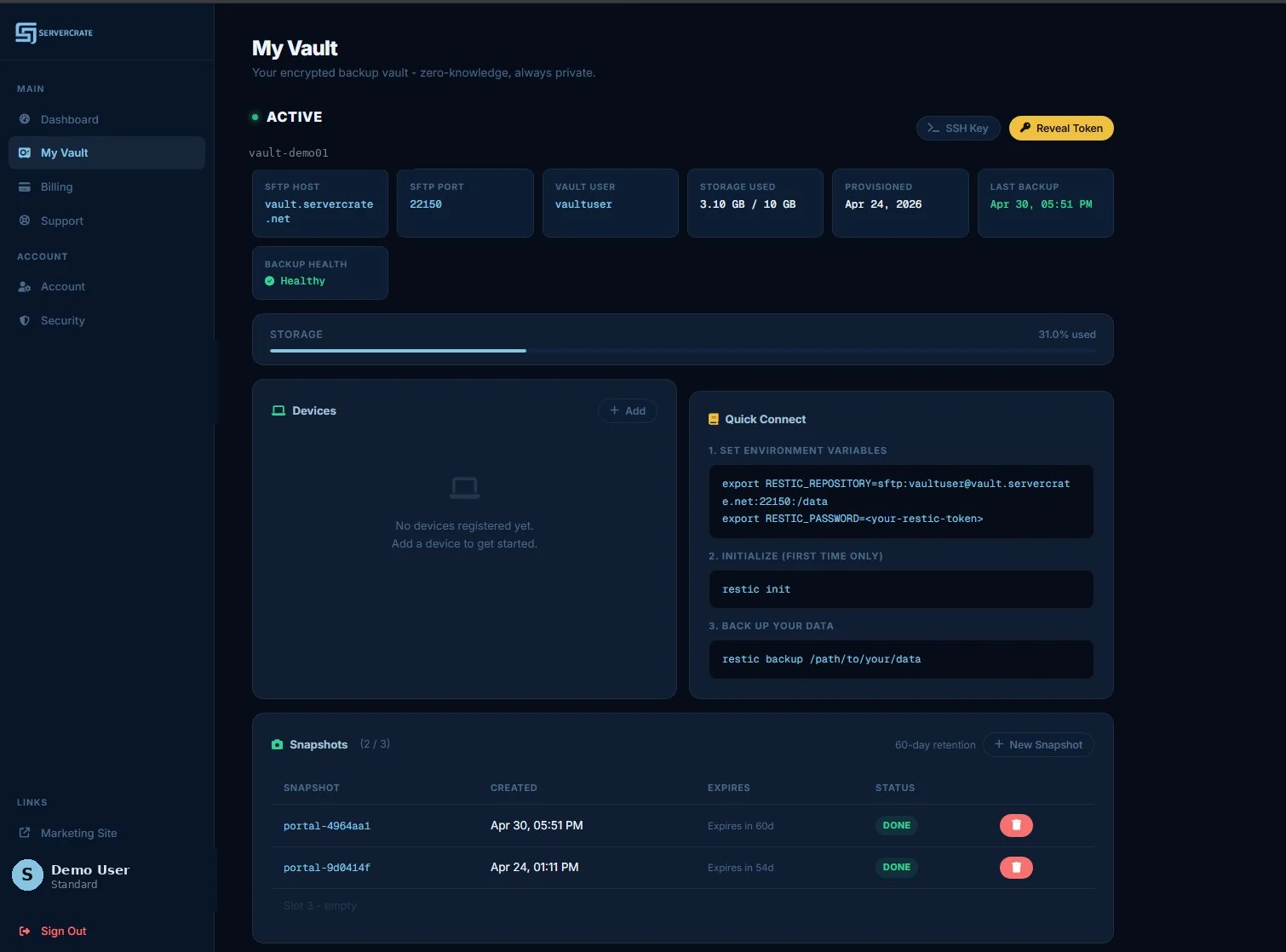
Inside the portal
Connection details, snapshots, and device management in one place.
Everything you need to connect Restic and monitor your backups. No support tickets, no console trails.
ServerCrate gives you a private Restic over HTTPS backup target with encrypted offsite storage, no egress fees, and a workflow that is easy to understand. Built for Linux servers, homelabs, Docker hosts, and serious file backups.
Use the free tier to validate your workflow first, then move up when storage or device count becomes the limit.
A lot of backup products bury the actual workflow behind vague "cloud backup" language. ServerCrate is straightforward: you get a private vault, connect Restic over HTTPS, run your backups, and restore without paying egress penalties.
Most managed backup services give you two bad choices: a proprietary agent that only talks to their cloud, or raw object storage that you have to assemble tooling around yourself. Restic over HTTPS skips both traps.
Every chunk is AES-256 encrypted with a key that only exists on your device. The vault sees encrypted ciphertext - no metadata, no filenames, no file sizes that would leak intelligence about your data. Even with full root access to the server, we can see that you have data, but not what it is.
Restic speaks rest-server's HTTP API natively, so there is no agent to install, no daemon to keep updated, and no SSH keys to provision or rotate. Authentication is a single per-vault token over TLS. The transport is ordinary HTTPS, so it works through firewalls and proxies that block SSH, and it makes fewer round-trips than SFTP.
Your Restic repo is a filesystem of opaque encrypted files. If you ever want to migrate to self-hosted, rsync.net, or a different backup host, you copy the files and point Restic at the new location. No export tools required. The repo format is documented and stable since 2017.
Numbers from backing up a mixed-workload server to a ServerCrate vault. Your results depend heavily on the file mix, your upload speed, and how much data has changed.
Upload speed is almost always the bottleneck on the first run. A 50 Mbps residential uplink will push about 5-6 MB/s, so 500 GB takes ~28 hours. Plan the first run over a weekend.
File mix matters for incremental runs. A dataset with lots of small files (Docker volumes with SQLite databases, for example) spends more time on metadata than throughput. Large VM exports that change in narrow byte ranges dedup beautifully.
Cold cache effects show up on restore. The first restore from a new session pulls index metadata first. After that, restore is as fast as your downlink.
Everything you need to connect Restic and monitor your backups. No support tickets, no console trails.
Transparency on the infrastructure, because people asking about backup hosting deserve to know what they're trusting.
Vaults live in LXC containers running on a Proxmox host with ZFS as the underlying filesystem. ZFS checksums every read and write - silent data corruption gets caught and repaired against a mirror, not blindly handed back to Restic. That matters for backups: a repo you are unable to actually restore from is worse than no backup at all.
Each customer gets a dedicated ZFS dataset with quota enforcement. Your data is physically separated from every other tenant's data. Not namespace isolation - separate datasets.
Your vault lives at <id>.vault.servercrate.net. Requests hit a hardened edge that terminates TLS - with post-quantum hybrid key exchange - and proxies through to the isolated container your repo runs in. The only thing reachable from the public internet is HTTPS; the vault containers themselves are never directly exposed. Authentication is a per-vault token, so there is no SSH surface to brute-force.
The edge runs nftables with default-deny - only the HTTPS ports are open. Probing and abusive IPs are banned automatically, and CrowdSec pulls a shared community blocklist, so at any given moment the edge is dropping 15,000+ addresses already seen attacking anyone else running CrowdSec. Access to the repo itself is gated by your per-vault token over TLS.
Restic's repository format wraps every backup chunk in AES-256-CTR with a Poly1305-AES MAC. The key is derived from your repository password via scrypt. That password lives only on your device - we store a hash of it in our database for provisioning, never the password itself.
Server-side we see a directory full of opaque data/xx/yyyyyy... files. Not filenames, not sizes that correlate to real files, not timing patterns that leak operational intel. Full zero-knowledge as a mathematical property, not a marketing claim.
If you've been researching this space, you've probably already looked at these. Here's the practical tradeoff.
| ServerCrate | rsync.net | BorgBase | Self-host SFTP | |
|---|---|---|---|---|
| Restic support | First-class | Supported | Borg + Restic | Yes |
| Entry price | $3/mo (250 GB) | $24/yr (100 GB)Cheaper annually | $24/yr (250 GB)Borg-first | VPS + time cost |
| Free tier | 10 GB, no card | None | 10 GB free forever | N/A |
| Dedicated storage | ZFS dataset per user | Shared ZFS pool | Shared pool | Whatever you build |
| Monitoring & alerts | Portal + email | Manual | Built-in alerts | Roll your own |
| Zero-knowledge | Client-side | Client-side | Client-side | You control the key |
| Egress fees | None | None | None | None if you're DIY |
| Time to first backup | 5 minutes | 15-30 min (SSH key setup) | 15-30 min | Hours to days |
| Best for | Managed Restic, one page | Long-tenure admins | Borg purists | Full control, time to burn |
For deep side-by-side analysis: Restic vs Borg vs Tarsnap vs Arq vs Duplicacy vs BorgBase vs rsync.net.
This is built for people who want clear offsite backup, not a messy pricing model or proprietary nonsense.
Your vault speaks Restic's native REST protocol, so the one tool you need is the Restic binary - on Linux, macOS, Windows, or BSD. No agent, no SSH keys, no GUI client to babysit: point Restic at your vault URL with your token and you are backing up. And because the repository is standard, open Restic format, you are never locked in - copy it to any other Restic backend, an SFTP host like rsync.net or BorgBase, S3, B2, or your own disk, and keep restoring exactly as before.
The strongest signal we can give you is to tell you when we are the wrong fit. Short and honest.
This page explains the product fit. These pages help with the next step.
Bitcoin-friendly: We accept on-chain BTC and Lightning via self-hosted BTCPay. See Restic backup paid with Bitcoin for the full breakdown.
Private vaults. Zero-knowledge design. No egress fees.
Built for clean offsite backup workflows.
Restic-friendly, no egress fees, cancel anytime
10 GB. No credit card. Setup in 5 minutes. Bitcoin or card when you upgrade.
Start free vault →