Homelab / Proxmox / Docker / NAS

Homelab backup storage.
Private offsite protection for the stuff that actually matters.

Your homelab probably has more important data than you think: configs, Docker volumes, VM exports, app data, keys, scripts, and snapshots. ServerCrate gives you encrypted offsite backup with private vaults, Restic over SFTP, and no egress fees when you need to restore.

Homelab-friendly
Restic over SFTP
Your key only
No egress fees
Homelab Vault - ServerCrate
Protected
Platform
Homelab
Backup Tool
Restic
Storage
ZFS
Status
Offsite
Common targetsDocker, Proxmox, NAS, Linux
Configs backup
01:15 AM
Done
Docker data
01:20 AM
Done
Restore check
Weekly
Ready
Encrypted before leaving your network
Linux / VM friendly
Docker-ready
NAS-friendly
Client-side encryption
Restore-ready workflow
ZFS-backed vaults
No egress fees
Linux / VM friendly
Docker-ready
NAS-friendly
Client-side encryption
Restore-ready workflow
ZFS-backed vaults
No egress fees
Why ServerCrate

Three things nobody else combines.

Restic-native, not Restic-compatible

Built for Restic from day one. Borg works too, but Restic is the default voice. BorgBase is Borg-first. We're the inverse.

ZFS-backed and we say so

Every vault sits on ZFS with checksumming and snapshots. Bit rot on a 3-year-old archive gets caught. Most providers won't tell you their backend.

US West Coast hosting

Single Los Angeles datacenter. Low latency for North American users. BorgBase is EU-only. rsync.net is multi-region but priced for it.

The actual problem

Most homelabs are one hardware failure away from regret.

A lot of people back up media and forget the real high-value data: router configs, compose files, reverse proxy configs, VM exports, app databases, SSH keys, automation scripts, and the weird pile of files that took months to get right.

ServerCrate is for getting that critical stuff offsite, encrypted, and recoverable without turning your homelab into a second full-time job.

01
Pick what actually matters
Configs, Docker volumes, app data, VM exports, and files you could not easily rebuild from memory.
02
Push it offsite
Use Restic over SFTP to get your critical homelab data off the same box, rack, or house.
03
Schedule and verify
Run automatic backups, keep retention sane, and make restore testing part of the workflow.
04
Recover without nonsense
Restore specific files or entire targets without getting smacked by egress fees.
Terminal - homelab backup
# Common homelab backup example
$ export RESTIC_REPOSITORY=sftp:vaultuser@vault.servercrate.net:22150:/data
$ export RESTIC_PASSWORD=your-secret-token
 
$ restic backup /srv /etc /opt /root/scripts
$ restic forget --keep-daily 7 --keep-weekly 4 --prune
snapshot saved - critical homelab data pushed offsite
By the numbers

Real backup performance from a real homelab.

These numbers are from an actual Proxmox homelab pushing data to a ServerCrate vault over a 1 Gbps residential uplink. Your speeds depend on your upload, the file mix, and how much data has changed since the last run.

Initial Upload
31 MB/s
Average throughput backing up 500 GB of Proxmox VM exports over WireGuard on a 1 Gbps residential uplink.
Incremental Run
2-6 min
Typical daily incremental on a ~200 GB homelab dataset. Restic's content-defined chunking uploads only changed data.
Dedup Ratio
3.2x
Storage efficiency on a typical homelab backup set with overlapping Docker volumes, VM exports, and config files.
First Restore
4 min
Pulling a single 800 MB Docker volume via restic restore on a gigabit downlink. No egress fees.
Why Restic performs well on homelab workloads

Homelab backup sets are full of overlapping data: the same base OS image in three VMs, the same config files in five containers, the same Docker layers shared across a dozen services. Restic's content-defined chunking sees that overlap at the block level and stores each unique chunk exactly once, even across different hosts backing up to the same vault.

That matters for cost. A 500 GB nominal backup set often fits in 150 GB of actual vault usage after the first run, and incremental runs typically upload 1-3% of total size per day.

Who this is for

Homelab setups ServerCrate was built for.

If any of these look like your rack, you are the target user. These are the workloads we tested and optimized for.

Proxmox cluster with mixed VMs and LXC containers

You have a three-node Proxmox cluster running a mix of VMs (a FreeBSD router, a Debian NAS, a Windows box) and LXC containers (Pi-hole, Jellyfin, Home Assistant, Nextcloud). You want vzdump exports going offsite, plus the config files inside each container so you can rebuild the stack if your entire rack dies. ServerCrate handles this as a single deduplicated vault. See our Proxmox backup guide for exact commands.

Proxmox VE LXC vzdump WireGuard
Docker host with 20+ self-hosted services

Nextcloud, Vaultwarden, Paperless-ngx, Immich, Home Assistant, Grafana, and the long tail of apps you accumulate running a homelab. Each has its own persistent volume and database. You need a single backup job that captures all of /var/lib/docker/volumes, the compose files in /opt, and any mounted bind-mount paths. One Restic run covers everything. See our Docker backup guide for volume-safe flags.

Docker Compose Vaultwarden Nextcloud Immich
NAS with TrueNAS, Synology, or Unraid

Your primary data lives on a NAS with on-box snapshots or RAID. That protects against disk failure, not against fire, theft, ransomware, or a botched update that nukes a pool. Restic pulls from an SSH-capable NAS to a ServerCrate vault overnight while you sleep. Works natively on TrueNAS and Synology.

TrueNAS Synology QNAP Unraid ZFS
Single-server homelab in a mini PC or NUC

Beelink, Minisforum, or Intel NUC running Debian or Proxmox. One machine doing everything: router, DNS, file sharing, a dozen self-hosted apps, and whatever else landed on it over the years. A full hardware failure would mean rebuilding from memory. ServerCrate gets a complete copy offsite, and setup is five minutes of copy-paste.

Mini PC NUC Debian Single-host
Inside the portal

Your vault, visible from one page.

Connection details, storage usage, snapshot history, and device management without digging through a maze of settings.
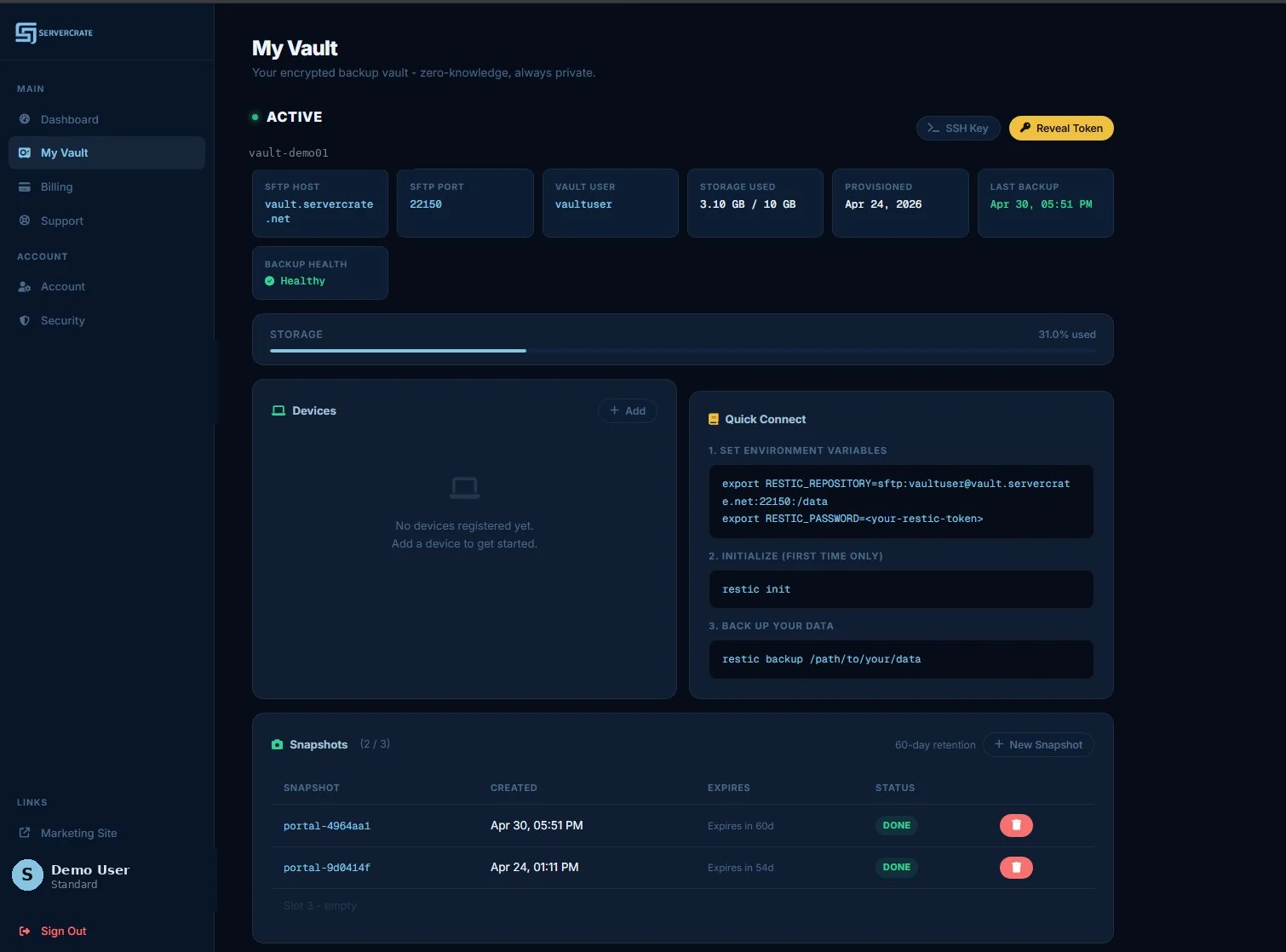
ServerCrate vault page showing SFTP host, port, user, Restic environment variables, and copy-paste connect commands
The vault page shows every detail needed to connect Restic: host, port, user, environment variables, and the exact restic init and restic backup commands to run.
How "your key only" actually works

When you first provision a vault, ServerCrate generates a Restic repository password on your behalf and shows it to you once. That password is the key that encrypts every chunk before it leaves your machine. Our database stores a hash of it, not the password itself, so even a full server compromise reveals only ciphertext.

You can rotate this password any time with Restic's key passwd command. We never see the new one. If you lose it, the data is mathematically unrecoverable - not even we can help. That's the tradeoff of real zero-knowledge encryption, and it's the whole point.

Honest comparison

ServerCrate vs the options you already considered.

All four options work. These are the practical tradeoffs for homelab use.

ServerCrate rsync.net BorgBase Backblaze B2
Entry price $5/mo for 200 GB $24/yr for ~100 GBLong-term cheaper $16.80/yr for 250 GB $6/TB/mo+ egress fees
Free tier 10 GB, 1 device None 10 GB free forever 10 GB
Backup tool Restic (SFTP) Borg, Restic, rclone Borg + Restic Anything S3-compatible
Zero-knowledge encryption Client-side Client-side Client-side Depends on tool
Egress fees None None None $0.01/GB after 3x stored
Underlying storage ZFS, dedicated vault ZFS, shared pool Shared pool Object storage
Setup friction 5-minute setup Manual SSH key setup Manual SSH key + config S3 keys, bucket config, rclone
Multi-device on one vault Up to 5 (Pro) Yes Unlimited S3 has no concept of devices
Who it's best for Homelabs wanting managed Restic Long-tenure backup admins Borg-first workflows High-volume or custom tooling
If you want object storage and you're happy building your own pipeline, Backblaze B2 is hard to beat on price. If you want a private vault that just works with Restic on day one, that's the problem ServerCrate exists to solve.

See detailed head-to-head comparisons: ServerCrate vs BorgBase and ServerCrate vs rsync.net.

From signup to first backup

The first five minutes.

Here's exactly what happens from the moment you sign up to the moment your first snapshot lands offsite.

Minute 1: Sign up
Email and password, no credit card. Pick the free plan to test-drive or go straight to Starter for 200 GB. Email verification link arrives in seconds.
Minute 2: Vault provisions automatically
Behind the scenes, we create a dedicated LXC container with its own ZFS dataset, generate SFTP credentials, and issue a Restic repository token. The vault page shows up in the portal with the connection string ready to copy.
Minute 3: Install Restic on your homelab
On Debian/Ubuntu: apt install restic. On Arch: pacman -S restic. On Alpine: apk add restic. The binary is a single ~20 MB file.
Minute 4: Paste the connection details and initialize
Copy RESTIC_REPOSITORY and RESTIC_PASSWORD from the portal. Run restic init. Your encrypted repository is now live.
Minute 5: Run your first backup
Pick what matters - configs, Docker volumes, VM exports - and run restic backup. Your first snapshot uploads encrypted in the background. From here, schedule it with a systemd timer and forget about it.

See the Full Setup Guide

The rule that actually works

The 3-2-1 rule for homelabs.

Keep three copies of data, on two different media, with one copy offsite. The rule has been around since 2005 and it still works because disk failures, power surges, fires, floods, theft, and ransomware all have one thing in common: they hit locally.

For a typical homelab:

Copy 1: Live data

The files as they exist on your NAS, server, or primary host right now. This is the copy you use daily.

Copy 2: Local backup on different media

A snapshot on a separate disk or pool in the same building - typically ZFS snapshots on a secondary NAS, rsnapshot on a USB drive, or Restic to a second local repository. Fast to restore from, but vulnerable to anything that hits your whole location.

Copy 3: Offsite backup (ServerCrate)

An encrypted copy somewhere that is physically and administratively separate from your homelab. This is the copy that survives the disasters that wipe out copies 1 and 2 simultaneously. See our full 3-2-1 strategy guide with Restic commands for each layer.

Why ServerCrate

Built for the kind of backup jobs homelabs actually have.

You do not need flashy consumer sync. You need private offsite backup that works with the stack you already run.

Offsite means offsite
A second disk in the same box is not enough. ServerCrate gets critical homelab data out of your house and into a private encrypted vault.
Docker and app data
Protect volumes, bind mounts, configs, and the app state that takes forever to reconstruct when things go sideways.
Linux and VM workloads
Good fit for Linux hosts, VM exports, LXC-related data, site files, reverse proxy configs, and core infra folders.
Your key only
Files are encrypted on your device before upload. ServerCrate does not store the key needed to read the contents.
ZFS-backed storage
Storage integrity matters for backups. ServerCrate is built on infrastructure chosen for reliability, not fluff.
No egress fees
You should be able to recover your own data without another bill appearing at the worst possible time.
What to back up

Good homelab backup targets.

Configs and scripts
System configs, reverse proxy configs, firewall exports, cron jobs, secrets templates, and the files that define how your stack actually works. The stuff you really do not want to rebuild.
App data and volumes
Docker volumes, self-hosted app data, database dumps, wiki content, dashboards, and service state that changes every day. Persistent data worth protecting.
Virtualization data
VM exports, LXC backup artifacts, and critical VM-level folders that help you recover faster after hardware failure or operator error.
Related pages

Keep the flow moving.

Start with the workflow, then compare options if you want.

FAQ

Questions?

Yes. ServerCrate is a strong fit for homelabs that need private encrypted offsite backups for configs, Docker data, Linux systems, VM exports, and other critical files.
Most people should protect configs, scripts, Docker volumes, database dumps, reverse proxy configs, app data, and any files they would hate to rebuild from scratch.
Yes. ServerCrate works well for Proxmox-related backup artifacts, Docker volumes, Linux-hosted services, and other self-hosted data that fits a Restic workflow.
No. Files are encrypted on your device before upload, and ServerCrate does not store the key needed to read your backup contents.
No. ServerCrate does not charge egress fees when you restore your data.
Start Today

Your homelab still needs
real offsite backup.

Protect the data that actually matters.
Private vaults. Zero-knowledge design. No egress fees.

Start Protecting My Stack -> View Plans

Built for real self-hosted workloads, cancel anytime

Next steps
How we protect your data
Zero-knowledge encryption, ZFS isolation, what we log
Who runs ServerCrate
Operating commitments, where data lives, transparency
First backup in 5 min
Sign up, init vault, run your first Restic backup
Try it before you decide

Encrypted Restic vault, free forever

10 GB. No credit card. Setup in 5 minutes. Bitcoin or card when you upgrade.

Start free vault →
All 5 plans

Flat monthly pricing. No egress fees.

  1. Free10 GB · forever
  2. Starter200 GB · $5/mo
  3. Standard1 TB · $15/mo
  4. Pro2 TB · $29/mo
  5. Business5 TB · $79/mo
See full pricing →